01 /
Explore connected components
Explore dependencies as lists or trees. Filter by name, version, license, or CVE, and distinguish direct from transitive dependencies.
VS CODE EXTENSION / SOFTWARE SUPPLY CHAIN
Generate a software bill of materials and check dependency vulnerabilities inside VS Code. Explore components, review available fixes, and export reports without leaving your development environment.

01 /
Explore dependencies as lists or trees. Filter by name, version, license, or CVE, and distinguish direct from transitive dependencies.
02 /
Review known vulnerabilities by severity and available fixes. CISA KEV flags and license categories help guide triage.
03 /
Explore HTML, integrate JSON, and deliver Word reports. Japanese output is supported, with scan status and coverage available for review.
01 / FEATURE TOUR
SBOM VULNERABILITY SCANNER / 01
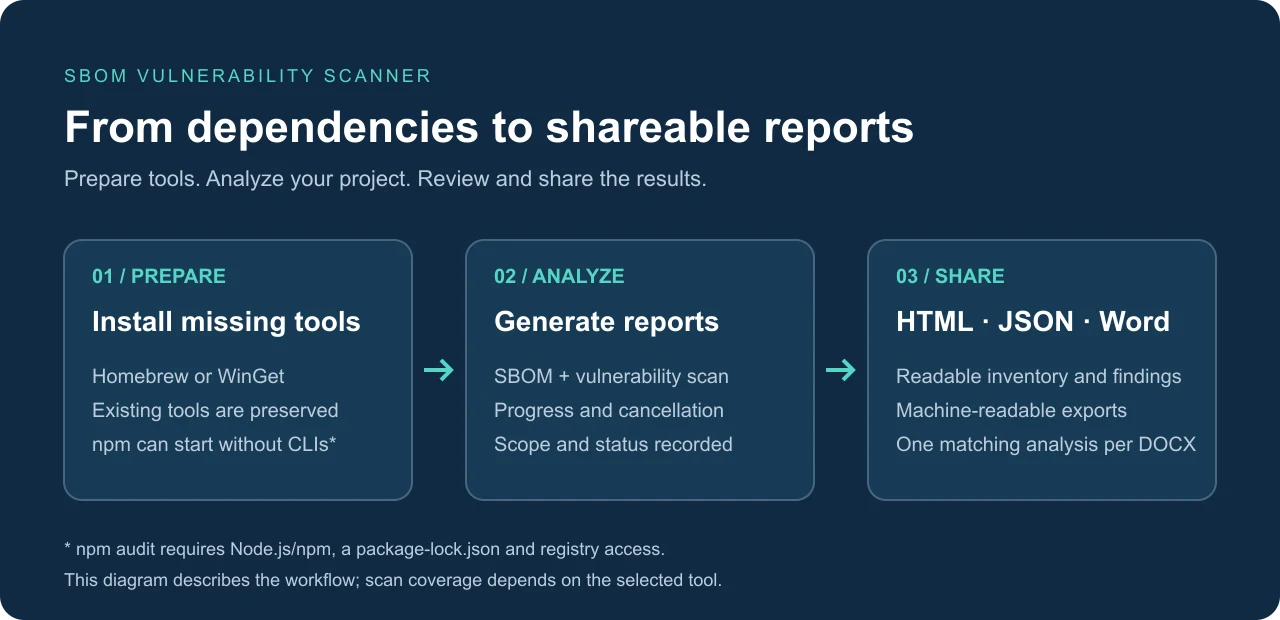
Generate and scan with Syft and Trivy. npm projects can start with manifest and npm audit without either external scanner. Coverage depends on the selected tools and lockfile.
Read the guide on this page ↓ SBOM VULNERABILITY SCANNER / 02
Export component inventories and vulnerability findings as HTML, JSON, or Word. When multiple npm projects are detected, generate an overall summary alongside per-project reports.
Read the guide on this page ↓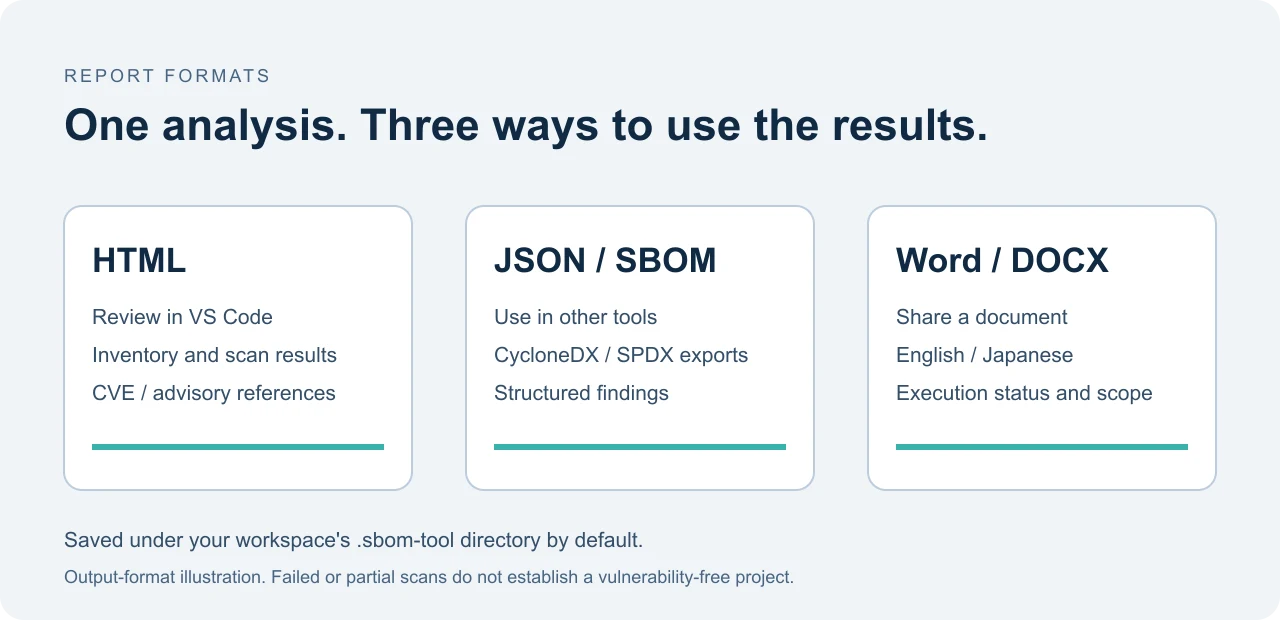
SBOM VULNERABILITY SCANNER / 03
Use package.json diagnostics and Quick Fix suggestions to review fixed versions. Suppression rules record reasons and expiry dates in reports. Reinstall dependencies and verify behavior after an update.
Read the guide on this page ↓{
"suppressions": [{
"cveId": "CVE-2023-12345",
"reason": "Review decision and supporting evidence",
"expires": "2026-12-31"
}]
}02 / FROM INPUT TO ACTION
Extract dependencies into an inventory exportable as CycloneDX or SPDX.
Scan with Trivy or npm audit, then review severity, available fixes, and execution status.
Review findings in the editor and share remediation decisions in reports.
03 / COVERAGE
Supports npm lockfiles and workspaces. Batch summaries preserve failed and skipped projects.
Coverage follows installed Syft and Trivy versions. Automatic setup requires tools such as Homebrew on macOS/Linux or WinGet on Windows.
04 / GET STARTED
Install the extension in VS Code 1.90 or later and open a trusted local project.
Open SBOM Scanner in the Activity Bar. For npm, choose manifest and npm-audit; otherwise prepare Syft and Trivy.
Generate and scan, review status and scope, then use the report exports available in your installed version.
START WITH YOUR PROJECT
SBOM Vulnerability Scanner
Analysis runs through the local extension and CLIs. npm audit sends dependency information to the configured registry; Trivy uses the network to update its database. Reports contain dependency names and target paths.
EXPLORE THE APPS / TIP
Choose an app to explore its features and how to use it.

Review code structure, technical debt, and security.
Explore the app Generate dependency inventories and check known vulnerabilities.
Explore the app
Trace LLM output and external input to risky operations.
Explore the app